Ask most vendors how their identity verification product is deployed, and the answer is "the cloud" — usually a specific public cloud region, sometimes with a data-residency add-on if you push. For a lot of use cases, that's a perfectly reasonable answer. For a growing number of teams — regulated financial services, government, healthcare, and anyone handling biometric data under strict data-protection regimes — it's the wrong starting question. The right first question is: where is this data allowed to go, and who is allowed to touch it?
Here's a framework for working through that question before you commit to a deployment model.
The three deployment models
Public cloud (SaaS)
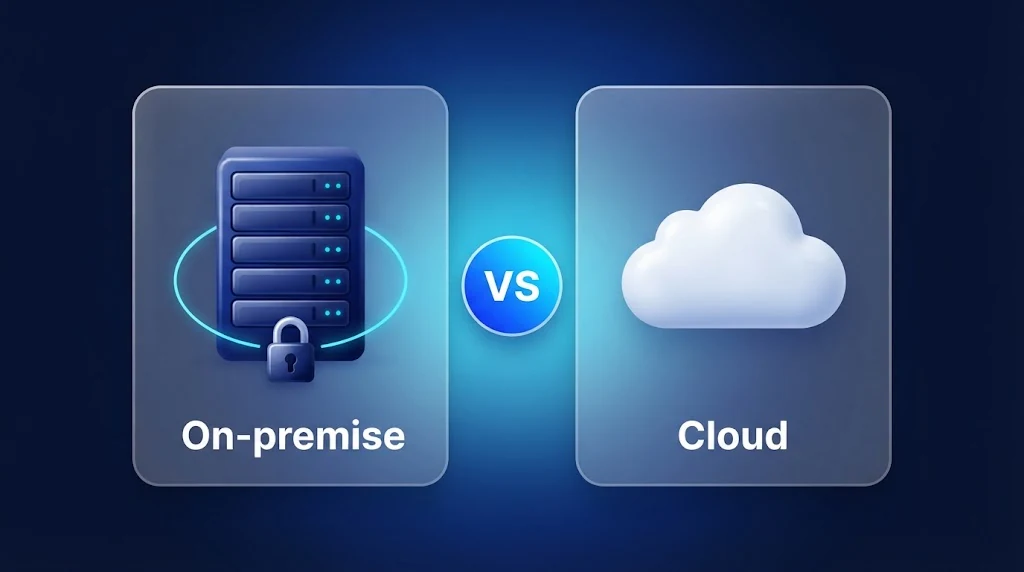
The verification vendor runs the service; biometric data and documents are sent to their infrastructure, typically a shared multi-tenant environment. Fastest to integrate, lowest infrastructure overhead, and the default model for most verification vendors. The tradeoff: your sensitive data leaves your infrastructure and your direct control, and you inherit the vendor's security posture, breach history, and jurisdictional exposure.
Private cloud / dedicated instance
A single-tenant deployment, either in the vendor's infrastructure or in your own cloud account (AWS, GCP, Azure), where the verification service runs in isolation from other customers. This narrows the blast radius of a vendor-side incident and can satisfy data-residency requirements by pinning the deployment region, without requiring you to run physical hardware.
On-premise / air-gapped
The verification service runs entirely inside your own infrastructure — your data center, your Kubernetes cluster, your servers — with no data leaving your network boundary. This is the model most large financial institutions and government agencies land on once biometric data protection requirements get specific enough. It requires more operational investment (you're running the service, not just calling an API) but gives you the strongest guarantee: the data never leaves your control, because it never leaves your network.
What each model means for compliance and data protection
Biometric data and identity documents sit at the sensitive end of most data-protection regimes. In many jurisdictions, biometric data used to uniquely identify a person is treated as a special category of personal data, which tightens the rules on how it can be collected, stored, transferred, and retained. Whether a given deployment model satisfies those rules depends on your sector, your regulators, and your contracts, and your legal and compliance teams should make that call. What you can do as an engineering or product owner is understand how each model changes the questions they will ask.
With a public cloud service, the vendor is typically acting as a processor of your data. That brings a data-processing agreement, a list of sub-processors, and a need to understand where each of them operates. Cross-border transfer rules can apply even if you never intended to move data abroad, simply because the vendor's infrastructure, support staff, or backups sit in another region. With a private cloud deployment in your own account, you control the region and the access policies, and the vendor's role narrows to supplying software. With an on-premise deployment, the vendor may never touch your data at all, which removes a whole category of questions about sub-processors, transfers, and vendor-side retention.
None of this means public cloud is non-compliant. Plenty of regulated organizations use it with the right contracts, regions, and controls in place. The point is that the deployment model determines how much of the compliance story you have to prove through paperwork and audits, and how much you can settle structurally by keeping the data inside your own boundary.
Questions that should drive the decision
Rather than starting from "which is cheaper" or "which is faster to integrate," work through these in order:
- Is there a regulatory or contractual requirement on where biometric or document data can be stored or processed? If yes, that alone may rule out public multi-tenant cloud, or restrict you to specific regions.
- Does your security or compliance team require that verification data never cross your network boundary? This is common in banking, government, and defense-adjacent contexts, and it points directly at on-premise.
- What's your latency budget? On-device or on-premise processing avoids a network round trip entirely, which matters for real-time capture feedback (guiding a user through a liveness check, for example) more than it does for asynchronous back-office review.
- What's your operational capacity? Running verification infrastructure yourself means you own uptime, scaling, and patching for it. If that's not a capability your team wants to build, private cloud gets you most of the isolation benefits without that overhead.
- How sensitive is a single breach, really? Biometric data is unlike a password: it can't be rotated. A breach of biometric templates has a different risk profile than a breach of, say, marketing email addresses, and that asymmetry is worth weighing explicitly, not just defaulting to "cloud is fine, everyone does it."
Cost and operational tradeoffs
Cost comparisons between deployment models are rarely as simple as comparing a per-verification price to a license fee, because the real difference sits in who carries the operational work.
A SaaS deployment shifts almost all of the operational burden to the vendor: capacity planning, patching, model updates, monitoring, and incident response. You pay for that convenience, usually per verification, and your costs scale directly with volume. That is a good fit when volumes are unpredictable or low, because you avoid paying for idle capacity.
A private cloud or on-premise deployment moves part of that burden to you. You provision compute (CPU, and GPU where models need it), you handle upgrades on your own change schedule, and you monitor the service like any other piece of production infrastructure. In exchange, your marginal cost per verification tends to fall at higher volumes, you are not exposed to a vendor's price changes or rate limits, and you can size capacity to your own peaks. Licensing models built around the number of deployments or users, rather than per call, can make costs far more predictable for high-volume flows.
When you build a cost model, include the items that are easy to forget: engineering time for the initial deployment, ongoing patching and upgrade work, on-call coverage, environments for staging and testing, and the cost of the compliance work that each model does or does not remove. A model that looks cheaper per transaction can end up more expensive once those items are counted, and the reverse is just as common.
Security considerations beyond data location
Where the data lives is the headline question, but it is not the only security difference between the models.
- Attack surface. A cloud service exposes an API endpoint that carries your most sensitive traffic across the public internet. An on-premise service can sit behind your existing network controls, with no inbound exposure to the vendor at all.
- Blast radius. In a multi-tenant environment, a vendor-side incident can affect many customers at once. Single-tenant and on-premise deployments contain an incident to one organization.
- Access and logging. With a self-hosted service, your own identity and access management, key management, and audit logging apply directly. You decide who can reach the service, how keys are stored, and what is logged and for how long.
- Updates in restricted networks. Fully air-gapped environments need a deliberate process for bringing in new versions and model updates, usually through a reviewed, offline transfer. That is extra work, and it is also what makes the environment genuinely isolated.
Independent assurance still matters whichever model you choose. Whatever the vendor says about its own controls, look for third-party evidence, such as an ISO/IEC 27001 certification or a SOC 2 audit report, alongside the deployment architecture itself.
A common middle path
Teams don't always have to pick one model for everything. A common pattern is running document and face capture SDKs on-device for immediate user feedback, pairing that with server-side verification deployed in a private cloud or on-premise environment for the actual decisioning, and reserving public cloud (if used at all) for non-sensitive auxiliary services. The deployment model doesn't have to be binary across your whole stack — it can be matched to what each component actually touches. The Identity Verification Suite is built around exactly this pattern: individual capture and decisioning SDKs that compose into a full workflow, deployed on whichever infrastructure each piece actually needs.
How to run a proof of concept
A short, structured proof of concept tells you more than any datasheet. Whatever model you are leaning toward, test it in the environment where it would actually run.
- Define success before you start. Agree on the metrics: end-to-end latency, accuracy on your own document and user mix, completion rate, and the operational effort needed to keep the service running.
- Deploy it where it will live. If the production target is your Kubernetes cluster or a private cloud account, run the trial there, not in a vendor sandbox. Deployment friction is itself one of the things you are evaluating.
- Use realistic data and devices. Test with the document types, regions, camera quality, and network conditions your real users have, including the awkward cases.
- Include your security and compliance teams early. Let them review the architecture, data flows, and logging during the trial instead of at the end, when changes are expensive.
- Plan the exit. Ask what moving to or away from the model would involve, so you are not locked in by a decision you made on day one.
Starting in one model and moving to another
The first deployment model you choose does not have to be the last. Some teams start with a hosted environment to prove the integration and the business case quickly, then move to private cloud or on-premise once volumes, regulators, or customers demand it. The easier that move is, the lower the risk of starting small, and it depends mostly on how the product is built. If the SDKs and APIs are identical across deployment targets, moving is mostly a matter of redeploying and repointing configuration. If they are not, moving means re-integrating. Ask a vendor directly which of those two situations you would be in.
What to ask a vendor
If you're evaluating verification vendors, a short list of concrete questions cuts through most marketing language quickly:
- Can the SDK or service run fully on-premise, with no calls to vendor-hosted infrastructure?
- If private cloud is used, does the deployment run in our cloud account, or theirs?
- What data, if any, is retained by the vendor after a verification completes, and for how long?
- Is on-device processing available for capture and liveness checks, independent of server-side deployment?
If a vendor can't answer these clearly, that's itself useful information about how seriously deployment flexibility has been engineered into the product, versus bolted on for a specific enterprise deal.
Frequently asked questions
Is on-premise identity verification slower to deploy than cloud?
The initial setup usually takes more effort, because you provision and configure the infrastructure yourself instead of calling a hosted API. Once it is running, day-to-day integration through SDKs and APIs looks much the same, and on-device or on-premise processing can reduce latency by avoiding a network round trip.
Does on-premise mean we cannot use any cloud services?
No. On-premise describes where the verification service and the sensitive data live. You can still use cloud services for parts of your stack that never touch biometric data or documents. Many teams run the verification layer on their own infrastructure and keep everything else where it already is.
Is private cloud the same as on-premise?
Not quite. A private cloud deployment in your own cloud account gives you strong isolation and control over region and access, but the infrastructure is still operated on a cloud provider's platform. On-premise means your own data center or servers, which is the strictest option when no data may leave your network.
Which model is best for regulated industries?
There is no single answer, because requirements differ by country, sector, and contract. Banks, government agencies, and healthcare providers often choose private cloud or on-premise because it makes data-location and access requirements easier to demonstrate, but your own regulatory and legal advisers should confirm what applies to you.