Most identity verification pipelines get document recognition right: pull the MRZ, read the barcode, extract the name and date of birth, classify the document type. What a lot of pipelines skip is a much simpler question that has to be answered first: is this even a real, physical document being captured live, right now, by this user?
That question is what document liveness detection answers. And skipping it is one of the most common gaps we see in verification flows that otherwise look sophisticated.
Recognition and liveness are two different jobs
It helps to separate the two problems clearly:
- Document recognition extracts data from a document — the name, number, expiry date, photo — and checks that the format is internally consistent (checksums, MRZ structure, field layout for the issuing country).
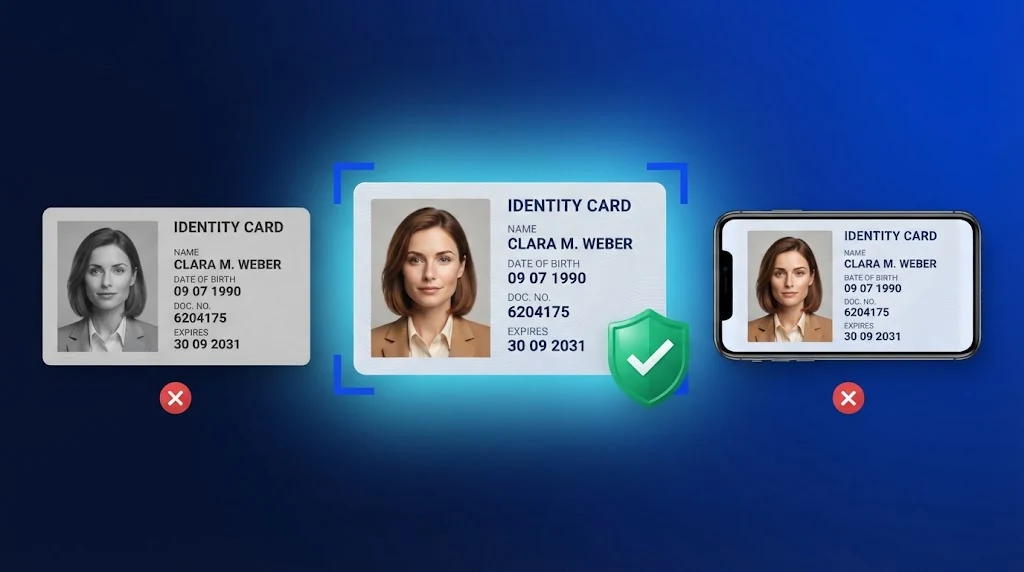
- Document liveness detection evaluates the capture itself: was this a live photo of a physical original, or something else — a photo of a photo, a screen replay, a scan, or a document that was never physical to begin with?
A document can pass every recognition check — correct format, valid checksum, well-formed MRZ — and still be fraudulent, because recognition never asked whether the thing it just read was real in the first place.
The attack surface recognition alone can't see
Fraud against document recognition typically doesn't touch the data fields at all. It targets the capture step, before recognition ever runs. The common patterns fall into a few categories:
Recaptures
A photo of a photo, or a photo of a document displayed on a second screen. A well-formed, high-resolution image of a real document — just not captured from the physical original. Recognition reads it fine; there's nothing wrong with the data.
Scans and photocopies
Flatbed scans and photocopies reproduce a document's data with high fidelity, which is exactly why they're a poor signal of authenticity on their own. The physical security features that make a real ID hard to forge — holograms, microprint, laser-perforation, UV-reactive ink — typically don't survive a scan.
Edited and tampered documents
A genuine document with one or two fields digitally altered. Recognition extracts the edited field correctly, because as far as OCR is concerned, it's just text on an image. Detecting the edit requires looking at the image itself for artifacts: cloned regions, inconsistent fonts, misaligned kerning, compression discontinuities around the altered area.
Template-generated fakes
Documents that were never a physical capture at all — generated from a design template, sometimes convincingly enough to pass a quick visual check and a naive OCR pass. These fail at the most basic level: there was no real capture event to be "live" in the first place.
Injected and virtual camera feeds
Rather than presenting a physical or even a fake document to a real camera, some attacks bypass the camera entirely and inject a pre-recorded or synthetic video stream directly into the capture pipeline. This is a capture-integrity problem as much as a document-authenticity one.
None of these require breaking recognition. They work precisely because recognition was never designed to ask "is this real," only "what does this say."
What document liveness detection actually checks
Document liveness is not a single test. It is a set of signals, read together, that indicate whether an image came from a live capture of a physical document. Different products weigh them differently, but the common families of evidence look like this:
- Screen and print artifacts. Photographing a monitor or phone screen leaves telltale patterns, such as moiré interference, visible pixel grids, and unnatural glare. Printed copies show halftone dots, flat color, and paper texture that do not match genuine card or booklet material.
- Optical security features. Real documents carry holograms, color-shifting ink, and other optically variable elements that change appearance as the document or the light moves. A static image or photocopy cannot reproduce that behavior, so analysis across several frames can reveal it.
- Geometry and edges. A genuine document photographed on a surface has consistent perspective, shadows, and edges. Cropped screenshots, pasted overlays, and screens held in front of a camera often betray themselves through bezels, uneven borders, or inconsistent depth cues.
- Image integrity. Editing tools leave traces: cloned regions, mismatched fonts or kerning, compression differences around altered fields, and noise patterns that change from one part of the image to another.
- Capture context. Signals about the capture process itself, such as whether the frames came from a real camera in real time, add to the evidence from the image.
No single signal is decisive, which is why robust systems combine several and produce a score or a pass/fail decision with a clear reason.
Why it matters for compliance
Regulated businesses are required to verify customers, a process usually called KYC (know your customer), and to guard against financial crime. An identity check that can be passed with a photo of a photo does not provide much assurance, whatever the data on the document says. Auditors and regulators increasingly look at how an organization establishes that the document was genuine and present, not only that its fields were read correctly, and evidence of a liveness or presentation-attack check strengthens the record of why a customer was approved.
The details differ across jurisdictions and sectors, and this is not legal advice. What holds almost everywhere is that being able to show a documented, repeatable control against forged and replayed documents is better than relying on informal review.
Where liveness fits in the pipeline
The practical answer is not to replace recognition with liveness detection, but to run them together, with liveness acting as a gate:
- Capture the document.
- Run liveness detection on the capture. If it fails, stop — don't extract or trust any data from this capture.
- If liveness passes, run recognition to extract and validate the data fields.
- Only data from captures that passed both steps proceeds to downstream decisioning (matching against a selfie, database checks, manual review routing).
This ordering matters. Extracting data first and checking liveness afterward as an informational flag tends to get deprioritized under product pressure — "the data looks fine, ship it." Gating on liveness before data is trusted removes that temptation structurally.
Balancing fraud prevention and user experience
Stricter checks catch more fraud and can turn away more genuine customers. Document capture is already the step where many onboarding flows lose people: glare from an overhead light, a shaky hand, a dark room, or a worn card can all make a legitimate document fail. A liveness layer that rejects too aggressively adds to that.
Good design reduces the problem before the check runs. Real-time guidance helps users frame the document, avoid glare, and hold steady, and automatic capture takes the photo when conditions are right rather than leaving timing to the user. When a capture does fail, say why in plain language, such as "move away from the light" or "show all four edges", so the retry is better than the first attempt. Limit the number of retries and route repeated failures to a human reviewer instead of looping the customer indefinitely.
It also helps to treat the result as a spectrum. Clear passes continue automatically, clear failures stop, and borderline cases go to step-up verification or manual review. That keeps friction low for the large majority of genuine users while concentrating scrutiny where the risk is.
Common mistakes to avoid
- Running liveness after extraction. If data from a failed capture has already entered downstream systems, a later warning flag may never be acted on. Gate first, extract second.
- Treating liveness as a score nobody owns. A signal that does not trigger a defined action is just a log entry. Decide in advance what happens on a pass, a borderline result, and a fail.
- Testing only with clean images. Evaluating on perfect scans hides how the system behaves on real phone captures. Include poor lighting, older devices, and worn documents.
- Ignoring the capture channel. Strong image analysis does not help if an attacker can inject a video stream past the camera. Pair it with controls on the capture pipeline.
- Never re-testing. Attack methods evolve. Review results regularly and update the system and the thresholds as new patterns appear.
Where the industry is heading
Presentation attack detection for documents is following a similar trajectory to face liveness detection a few years ago: it's moving from a nice-to-have to an expected line item in vendor evaluations and compliance checklists, particularly for financial services and other regulated onboarding flows. Standards work in this space (including presentation-attack-detection frameworks adjacent to ISO/IEC 30107-3, originally written for biometric modalities) is increasingly referenced by teams building document-fraud detection, even where a document-specific standard doesn't yet exist.
How to evaluate a document liveness solution
When you compare vendors, concrete questions separate real capability from marketing language:
- Which attack types does the system detect: screen replays, printed copies, scans, edited fields, template fakes, and injected streams?
- Is there independent testing, and for which version and configuration?
- Does it return a clear reason for each rejection, so your support and review teams can act on it?
- How does it behave on low-end devices and in poor lighting?
- Can it run on-device or inside your own infrastructure, so document images do not have to leave your environment?
- How does it handle documents from the countries and formats you need to support?
If you are building a full pipeline, consider how these pieces work together. Identixia's Document Liveness Detection SDK is designed to sit in front of the ID Document Recognition SDK, so only captures that pass the liveness gate reach data extraction. Both can run on-device or inside your own infrastructure, which keeps document images under your control.
If you're building or buying an ID verification pipeline today, the practical takeaway is simple: don't treat document liveness detection as an optional add-on to recognition. Treat the absence of it as an open attack surface.
Frequently asked questions
What is the difference between document recognition and document liveness detection?
Recognition reads and validates the content of a document, such as the name, number, dates, and machine-readable zone. Liveness detection evaluates the capture itself, to determine whether the image shows a live, physical document or a replay, copy, edit, or fake.
Can OCR or MRZ validation alone detect a fake document?
Not reliably. A forged or recaptured document can have correctly formatted fields and a valid checksum, so recognition passes even though the document is not genuine. Liveness checks look at the image evidence that recognition does not examine.
Does document liveness add a lot of friction for users?
It does not have to. Most of the analysis runs in the background on frames the user is already capturing, and good capture guidance means most genuine users pass on the first attempt. Extra steps are best reserved for borderline results.
Do we still need a selfie check if we have document liveness?
Usually yes. Document liveness helps establish that the document is genuine and present, while a selfie with face liveness and face matching helps establish that the person presenting it is the person on the document. The two checks cover different risks.