Face liveness detection exists to answer one question before face matching ever runs: is there a real, live human in front of the camera right now, or is this a spoof — a printed photo, a phone or tablet screen replaying a video, a mask, or a synthetic deepfake feed? There are two broad approaches to answering it, and teams evaluating a face verification SDK often assume one is simply "better" than the other. In practice, they trade off differently, and the right choice depends on your product and threat model.
Passive liveness detection
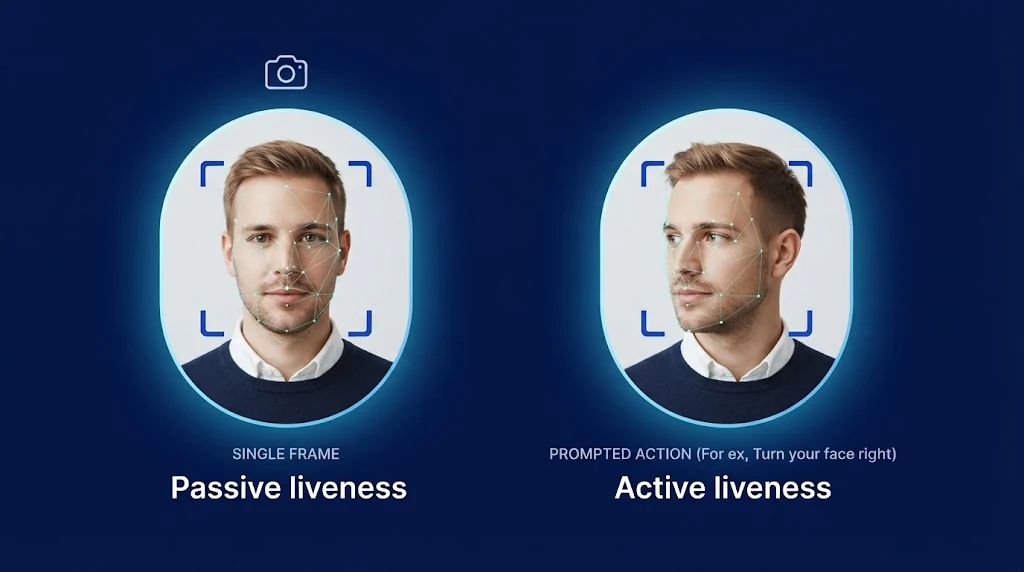
Passive liveness analyzes a single image or a short burst of frames captured from a normal selfie, without asking the user to do anything beyond looking at the camera. The detection model looks for spoof artifacts in the image itself: screen moiré patterns, unnatural reflections, edge and bezel artifacts from a printed photo or phone frame, texture inconsistencies that don't match live skin, and depth/perspective cues that a flat spoof can't reproduce.
Strengths: fast (often under a second), frictionless (feels like taking a normal photo), and doesn't depend on the user following instructions correctly, which matters for accessibility and for less tech-comfortable users.
Tradeoffs: because it works from limited signal, passive detection can be more sensitive to capture conditions — poor lighting, low camera quality, or unusual angles can affect accuracy in either direction. It also has to keep pace with increasingly sophisticated spoof generation, since the entire check happens against static or near-static evidence.
Active liveness detection
Active liveness prompts the user to perform an action — turn their head, blink, smile, follow a moving target with their eyes, or speak a randomized phrase — and verifies that the response matches what a live, responsive human would produce in real time. Because the prompt is often randomized per session, a pre-recorded video generally can't satisfy it; a would-be attacker would need to convincingly fake a response to an instruction they couldn't know in advance.
Strengths: the challenge-response mechanism raises the bar against pre-recorded and even many real-time synthetic attacks, and gives you an explicit, auditable interaction to point to in a review.
Tradeoffs: takes longer, introduces friction (some users find the extra steps annoying, and it can add real difficulty for users with certain motor or vision impairments), and depends on the user correctly following instructions — which can itself introduce false rejections that have nothing to do with fraud.
How attackers target each approach
It is easier to compare the two methods once you look at the attacks they face. Presentation attacks are the familiar ones: a printed photo, a video replayed on a phone or tablet, a mask, or a screen showing a deepfake in front of a real camera. The attacker is presenting something fake to a genuine camera, and both passive and active liveness are designed to catch this.
Injection attacks are a different category. Instead of holding something up to the lens, the attacker bypasses the camera and feeds a pre-recorded or synthetic video stream straight into the capture pipeline, for example through a virtual camera driver or a tampered app. Here the question is no longer just whether the face on screen looks real, but whether the video came from a real camera at all. A passive check that only analyzes pixels may have no way of knowing, and an active challenge can be defeated if the injected stream is generated in real time to respond to the prompt.
This is why liveness detection works best as one layer in a broader capture-integrity strategy. Checks on the device and the capture pipeline, such as detecting virtual cameras, emulators, and modified apps, sit alongside the liveness model itself. Neither passive nor active liveness removes the need for those layers, and neither approach is secure against every attack on its own.
How to choose
A short framework for the decision:
- What's the cost of a false accept? High-value or high-risk flows (account takeover recovery, large financial transactions, government-issued credentials) can usually justify the added friction of active liveness. Lower-stakes flows (a marketplace account signup) often can't.
- What's your onboarding conversion tolerance? Every additional step in an onboarding flow measurably reduces completion rates. If your product is friction-sensitive, passive detection with a strong fallback path for edge cases is usually the better starting point.
- What does your threat model actually look like? If your main risk is casual fraud with printed photos or simple photo/video presentation, passive detection alone may be sufficient. If you're specifically defending against sophisticated, targeted attacks, the added assurance of an active challenge is more likely to be worth the friction.
- Do you need an audit trail of user interaction? Some compliance or dispute-resolution processes benefit from being able to show that a user actively responded to a specific, session-unique prompt, not just that a still image passed a model.
Standards and independent testing
Vendor claims about liveness are only as useful as the evidence behind them, so it helps to know the vocabulary. The international standard for presentation attack detection is ISO/IEC 30107, whose third part defines how to test and report PAD performance. Two error rates matter most. The attack presentation classification error rate (APCER) is the share of attacks the system wrongly accepts as genuine. The bona fide presentation classification error rate (BPCER) is the share of real users it wrongly rejects. They pull against each other: tightening the system to catch more attacks usually raises the number of genuine users who are turned away.
Independent laboratories test products against this framework, and results are commonly described in levels that reflect how capable the attackers in the test were. Lower levels use attackers with no special expertise and simple spoofs, while higher levels use more skilled attackers and a wider range of attack types. When you read a test result, ask which level was tested, which attack types were included, and whether the result applies to the exact product version and configuration you would deploy. A test passed under one configuration does not automatically carry over to another.
Measuring liveness in your own flow
Published error rates describe a lab. Your real users will behave differently, so the most reliable way to choose is to measure inside your own funnel. A practical approach is to track a small set of numbers for each liveness approach you try:
- Completion rate: the share of users who finish the liveness step. A drop here points to friction.
- Retry and abandon rate: how many users need more than one attempt, and how many give up.
- Time to complete: the added seconds the step puts on your flow.
- False reject signals: manual-review outcomes that show genuine users being turned away.
- Confirmed fraud outcomes: attempts that were later confirmed as attacks, and whether liveness caught them.
Break these down by device type, operating system, lighting conditions, and region. A model that performs well on recent flagship phones may behave quite differently on older devices with low-quality cameras, and your user base decides which of those matters. An A/B test between a passive-first flow and an active-first flow, run on a limited share of traffic, usually gives a clearer answer than any benchmark.
Accessibility and inclusion
Friction is not distributed evenly across users. Active challenges that ask someone to turn their head quickly, follow a moving dot, or speak a phrase can be hard or impossible for people with certain motor, vision, hearing, or speech differences, and can be confusing for people who are not comfortable with technology. If your active flow is the only path, those users may be locked out through no fault of their own.
Passive detection helps, but it brings its own fairness question: any model can perform differently across skin tones, ages, lighting conditions, and camera qualities. Ask vendors how they evaluate that, and test on a user mix that resembles your own. Whatever approach you choose, give people an alternative route, such as a retry with clearer guidance, a different challenge type, or a manual review path, so a failed check does not become a dead end. It is better for the product and for fairness.
Where processing happens
Liveness checks can run on the device, on your own servers, or in a vendor's cloud, and the choice affects both privacy and experience. Processing on the device or on infrastructure you control means face images and templates do not have to be sent to a third party, which is often a requirement for biometric data. It can also give users faster feedback while they are framing their face, because there is no network round trip. If keeping biometric data inside your own environment matters to you, look at the deployment options as carefully as the detection method itself. Our guide to on-premise vs. cloud identity verification goes into those tradeoffs.
They're not mutually exclusive
Many production systems don't pick one and stop there. A common pattern is passive detection as the default path for most sessions, with active liveness triggered conditionally — for higher-risk transactions, when a risk-scoring signal flags the session, or as a step-up challenge when passive detection returns a borderline (rather than a clearly pass or clearly fail) result. This gets you the low-friction default experience most of the time, with a stronger check reserved for the sessions that actually warrant it.
Whichever approach (or combination) you land on, the same rule from document liveness detection applies here too: liveness should gate what happens next, not just annotate it. A face match should only be trusted once liveness has passed, not run in parallel with liveness as an independent, ignorable signal.
Frequently asked questions
Is passive or active liveness more secure?
Neither is universally more secure. Active liveness adds a challenge-response step that is harder to defeat with pre-recorded material, while modern passive models can detect many spoofs without any user action. Security also depends on the quality of the model, the capture pipeline, and how the check is combined with other signals.
Does liveness detection replace face matching?
No. Liveness answers whether a real person is present, and face matching answers whether that person matches a reference such as the photo on an ID document. They are separate checks, and matching should only be trusted after liveness has passed.
Can deepfakes defeat liveness detection?
Deepfakes are a real concern, particularly when they are injected directly into the video stream instead of being shown to a camera. Defending against them takes a combination of liveness analysis, checks on the integrity of the camera and capture pipeline, and risk signals, instead of relying on one control.
Can we use both approaches in the same product?
Yes, and many teams do. A common design uses passive liveness as the default and triggers an active challenge only for higher-risk sessions or borderline results, which keeps friction low for most users while still adding assurance where it counts. You can read more about our approach on the Face Liveness Detection SDK page.